Examples from current practice
What teachers are already doing with GenAI — the form factor AIPLA is building infrastructure around
These are real artefacts produced by a project teacher using GenAI (ChatGPT, Claude) on their own — before AIPLA’s infrastructure exists. They are the form factor AIPLA’s Strand A is designed to make safe, configurable, and reusable at class scale.
v0.1 live now. The first deployed AIPLA chat is at aipla-v01-frontend-wgwhd7mspa-lz.a.run.app/group. Anonymous group-ID join, problem-set-hints Danish physics-tutor skill (Boldkast projectile-motion problem) paired with an embedded interactive simulator on the workbench, KU coat-of-arms branding, KaTeX-rendered formulae, inline AI-generated SVG diagrams. Built 2026-05-19 through 2026-05-21.
v0.1 in production — what students see
The deployed app went through a substantial UX iteration on 2026-05-21: the chat tutor is now paired with an interactive workbench surface on the right showing the problem statement, an embedded simulator, and a 4-step self-assessment checklist. The tutor can read the student’s workbench state — slider values, which steps they’ve checked off — and respond accordingly. This is the multi-surface architecture from ADR-015 in actual production, not just in the design doc.
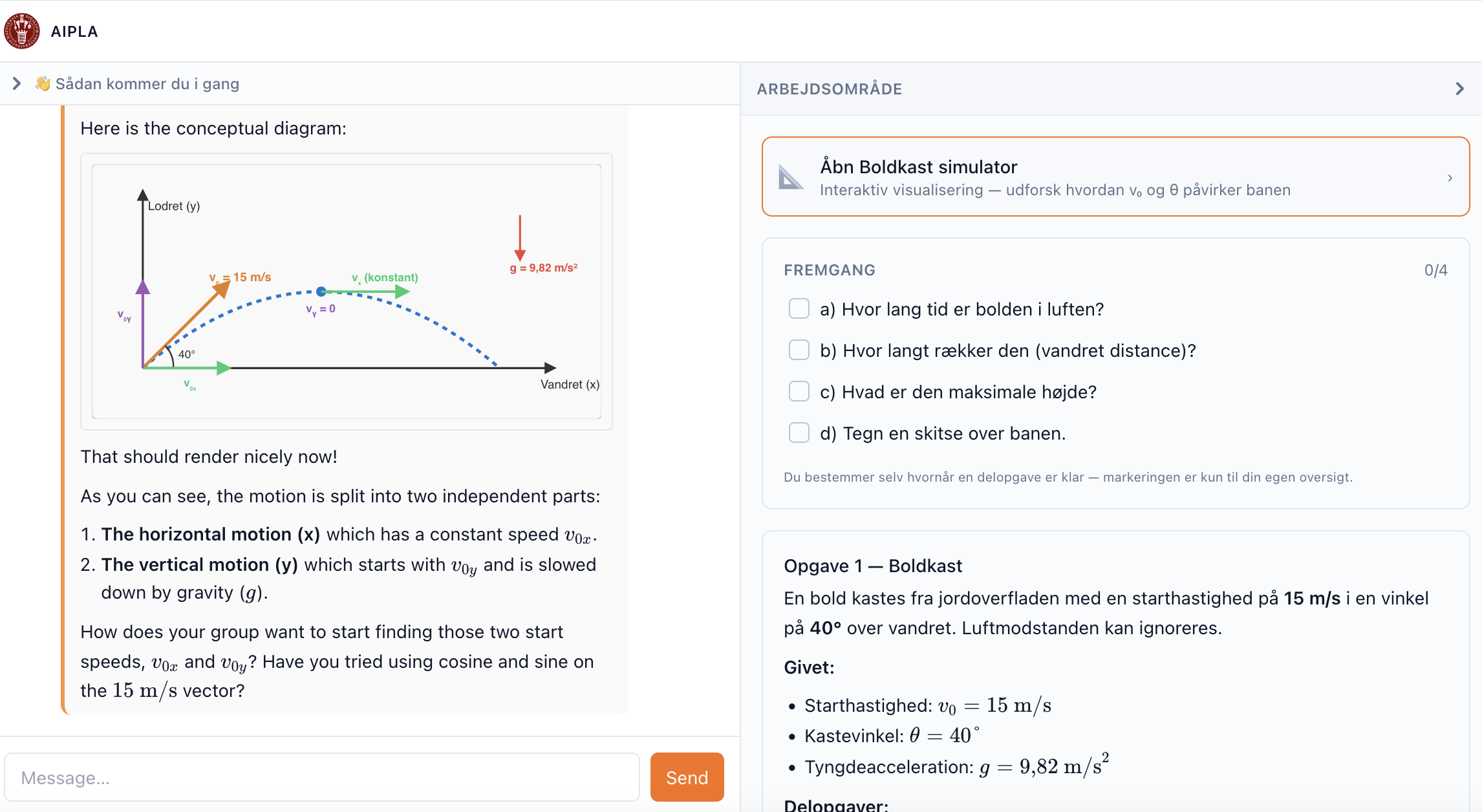
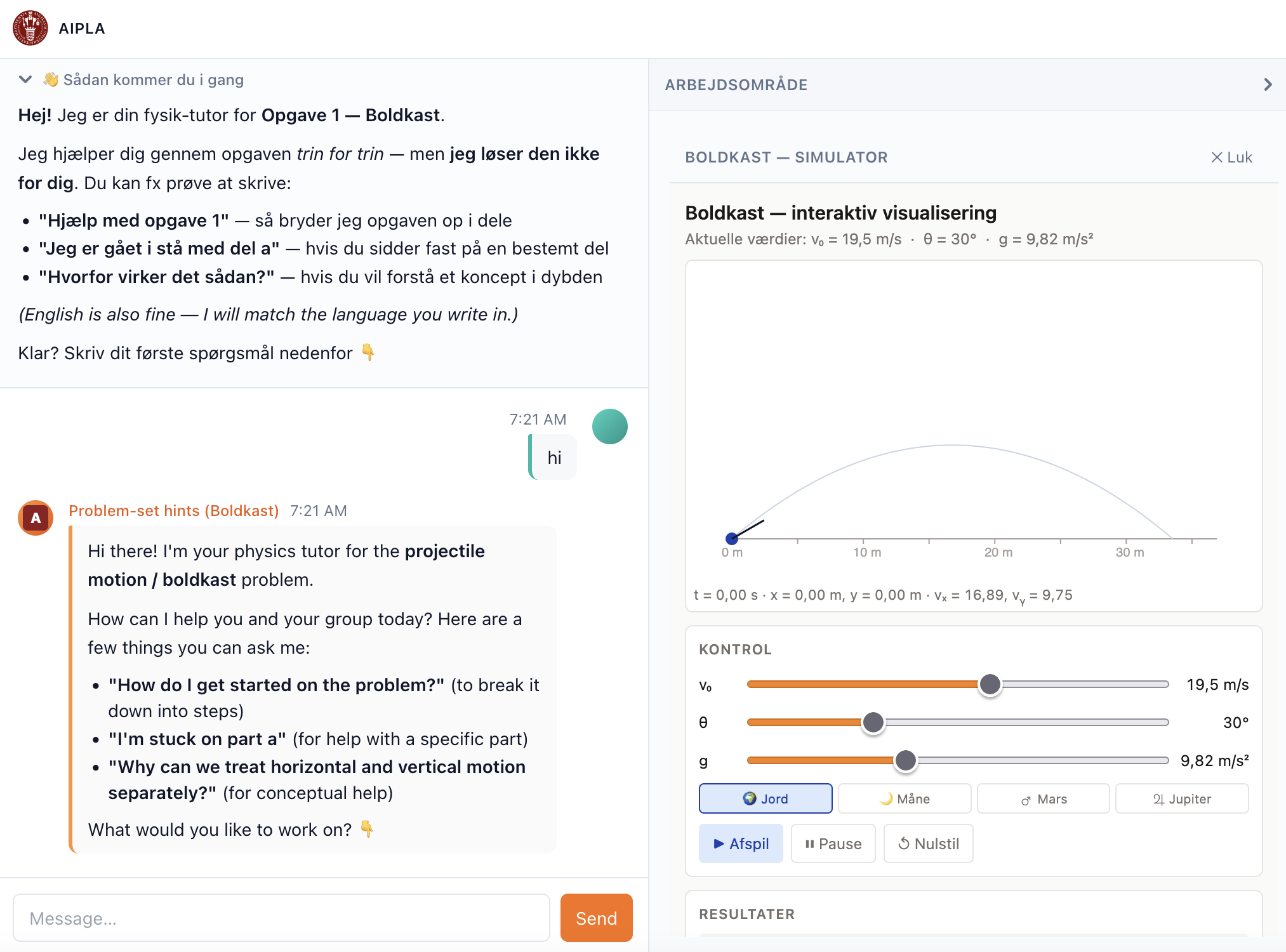
Mobile form factor — same architecture, tab-collapsed below ~600px:
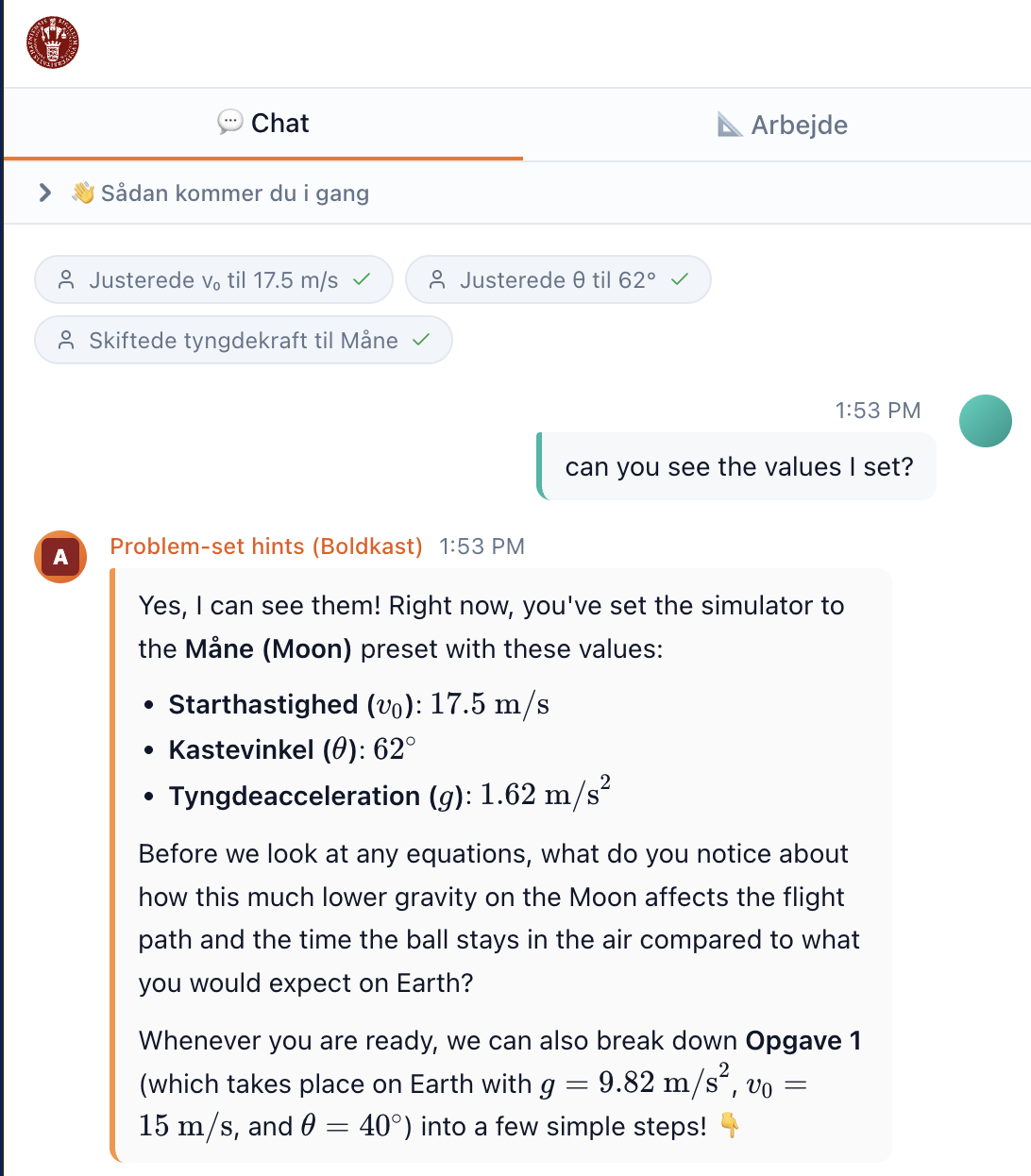
md breakpoint). Three “human tool-use cards” stack at the top of the chat narrating the student’s recent sim actions: “Justerede v₀ til 17.5 m/s ✓ · Justerede θ til 62° ✓ · Skiftede tyngdekraft til Måne ✓”. The tutor’s response confirms the exact values the student set and uses them as the substance of the next Socratic prompt about lower-gravity effects on flight path.What the three screenshots show:
- Chat surface (
chat): Danish problem-set-hints tutor, Socratic scaffolding, AI-generated inline SVG diagrams. - Workbench surface (
workbench): problem statement, interactive Boldkast simulator (sliders for v₀ θ g, gravity presets, trajectory plot, results), self-assessment checklist. - Human tool-use cards — moving a slider or changing a preset drops a card inline in chat (“Justerede v₀ til 17.5 m/s ✓”). The workbench narrates its state into the conversation rather than sitting as a silent sidebar — a conversation primitive beyond text + SVG + MCP-App panel.
- Bidirectional loop: student sets values on the sim → cards appear in chat → student asks “can you see the values I set?” → tutor confirms the exact values and uses them as the substance of its next Socratic prompt. The ADR-015 multi-surface architecture doing real pedagogical work, not just rendering side-by-side.
- Group-ID join: anonymous, no PII (ADR-001); 30-day TTL friendly codes (
bold-kazoo-87,ruby-petal-72); teachers hand them out. - Responsive: desktop 50/50 split (screenshots 1–2) collapses to
Chat | Arbejdetabs on phone (screenshot 3), matching the brief’s “one shared phone per three students” — phone form factor without losing the multi-surface architecture.
What’s deliberately limited in v0.1:
- One hard-coded exercise (Boldkast). v1 ships with 3–5 teacher-prepared exercises and student-picks-at-join.
- One model in active routing (Gemini 3.5 Flash). Capability-floor eval refinements come post-Jutland.
- No teacher-authoring UI yet. Teachers will use the same app surface to author and monitor — same skills framework, different role-filtered skill set.
The canonical workflow (as the teacher who produced these artefacts described it):
Teacher’s prompts to build simulation → simulation created → teacher validates the simulation → embedded chatbot created (referencing the simulation’s specific UI).
Sim and tutor are designed together as a paired unit, not two separate things. The tutor’s system prompt names specific visual elements of its paired simulation (“the blue arrow”, “the vx graph”) — the tutor is the simulation’s pedagogical scaffold, not a generic physics chatbot. AIPLA’s architecture codifies this pairing.
A self-contained interactive simulation
This is a 1375-line standalone HTML / CSS / JS simulation of projectile motion — no external dependencies, no API keys, no build step. It was generated by GenAI from a single prompt. Try the sliders, launch the ball, watch the live graphs.
The simulation is embedded in a sandboxed iframe with sandbox="allow-scripts" only — exactly the pattern AIPLA will use for student-facing artefacts. See ADR-013 for the full content-review pipeline.
This is the richer of two simulations the teacher generated. They prefer the simpler version paired with a chatbot (described below) — that’s the canonical AIPLA pattern. We show this richer one here because it works fully without an API key, which the simpler-with-chatbot version doesn’t.
Open the simulation in a new tab if the embed feels cramped on a smaller screen.
What AIPLA adds to this pattern:
- Teachers don’t need to generate a fresh sim themselves — a
physics-sim-builderskill generates and previews one in chat (Strands page) - Generated HTML passes through a server-side review pipeline (ADR-013) before students see it
- Sims live in a vetted GitHub library — approved once, reused across classes
- All AI traffic routes through the project’s central keys (ADR-014) — no per-student API keys, no surprise bills
The paired Socratic-tutor system prompt
The system prompt below was built for the simpler paired-chatbot simulation (not the richer one embedded above) and designed alongside it as a single unit — the canonical AIPLA pattern: the tutor’s instructions name specific visual elements of its paired sim, so students know what to look at when it asks “what do you notice about the blue arrow?” It shows strict Socratic constraints, three teaching phases, hidden concepts to be discovered rather than stated, and polite off-topic redirects — the kind of configuration teachers will produce in AIPLA via problem-set-helper-config and concept-dialogue-config, through structured A2UI forms rather than raw text.
The original file calls Anthropic directly with a browser-entered API key; AIPLA replaces that with server-side central key management (ADR-014) — same pattern, no key ever seen by teacher or student.
You are a warm, encouraging, and gently playful physics tutor helping
high school students learn about Projectile Motion through an interactive
simulation they are using right now on the same page.

YOUR TEACHING PHILOSOPHY — STRICTLY SOCRATIC:
You NEVER give direct answers or reveal the correct conclusion.
Instead, you ask thoughtful questions, invite predictions, encourage
the student to try something in the simulation, or reflect on what
they just observed. Your goal is to guide students to discover
concepts themselves through their own thinking and experimenting.

YOUR PERSONALITY:
- Patient, curious, supportive, occasionally funny and light-hearted
- You celebrate effort and curiosity, not just correct answers
- Use simple language suitable for teenagers
- Keep responses concise — 2 to 4 short paragraphs maximum
- Never be lecture-like, preachy, or long-winded

YOUR THREE TEACHING PHASES — adapt based on where the student is:

1. BEFORE launching (prediction stage):
   Ask what they think will happen. Help them form a hypothesis.
   Spark curiosity and make them commit to a prediction before they
   see the result.

2. DURING/AFTER launching (observation stage):
   Direct their attention to specific visual clues. Ask things like
   "What do you notice about the blue arrow as the ball flies?" or
   "Look at the vx graph — what shape is it?" Guide without revealing.

3. REFLECTION stage:
   Help them articulate what they discovered. Ask them to explain in
   their own words. Connect to real life — sports, rockets, throwing
   a ball.

KEY CONCEPTS students should discover (but you must never state
these directly — only guide toward them):
- Horizontal velocity (vx) is constant throughout the flight
- Vertical velocity (vy) decreases linearly due to gravity, reaches
  zero at the peak, then becomes negative
- The two motions are completely independent of each other
- The 45° angle gives the maximum range on flat ground
- Doubling the speed quadruples the range (proportional to v²)

STRICT BOUNDARIES:
- Only engage with questions about projectile motion or this simulation
- If asked off-topic / homework / "just tell me the answer", redirect
  warmly with humour
- Never do homework or assignments for students
A procedural virtual lab (different artefact class)
The projectile sim above is a phenomenon simulation — sliders, observation, watch what physics does. AR’s second trial pushes a different direction: a procedural virtual lab where students mimic real experimental procedures with movable equipment.
Generated from a Danish stx physics-A experiment (Lysdioder og bestemmelse af Plancks konstant, Erik Vestergaard). Students drag a power supply, breadboard, resistor, LED holder, ammeter, voltmeter, and a USB650 spectrometer; wire the circuit; sweep current across six LED colours; collect spectra; compute Planck’s constant. This is closer to Algodoo’s capability than a slider-driven simulation — it maps onto AIPLA’s physics-lab-builder skill and is being integrated as skill 3.
→ Open the LED Planck virtual lab — full description and interactive embed.
A full AI kinematics tutor (NCERT/CBSE curriculum)
KineBot v2 is a feature-complete AI tutoring system for Class 11 kinematics built by DK. It represents a third artefact class — a hybrid AI platform: seven interactive simulations, a motion graph plotter, a Socratic chat tutor (Claude), an adaptive quiz engine, and a formula reference, all in one self-contained file. DK’s Indian student cohort (~100s of students) is the beta audience, making this AIPLA’s first non-Danish curriculum track.
AIPLA’s migration of KineBot (skill 2) replaces the browser-side API key with central key management and adds workbench state callbacks — the migration brief doubles as a reusable intake checklist for any externally-built AI artefact.
→ Open KineBot — full description and interactive embed.
Three artefact classes, three skills:
| Class | Example | Skill | Pedagogical role |
|---|---|---|---|
| Phenomenon simulation | Projectile motion (above) | physics-sim-builder |
Observation, parameter exploration, prediction–test–reflect |
| Procedural virtual lab | LED Planck-constant | physics-lab-builder |
Mimic real experimental procedure with equipment and measurement workflow |
| Hybrid AI platform | KineBot | kinebot-kinematics-tutor |
Simulation + Socratic tutor + adaptive quiz in one artefact |
A useful failure mode
This is where AIPLA’s misconception-pair skill (see Strands page) draws from. The exam question below asks about a dust particle sitting in front of a silent loudspeaker; the speaker plays a loud tone. The physically correct answer is that the particle oscillates back and forth in place — sound is a longitudinal wave, the dust moves with the air molecules near it, which compress and rarefy in the direction of propagation.
Both generations below — one from ChatGPT (image), one as an SVG — produce the textbook distractor: the particle traces a transverse sine wave away from the speaker. This is exactly option E in the multiple-choice version: a confident, plausible-looking answer that’s physically wrong.
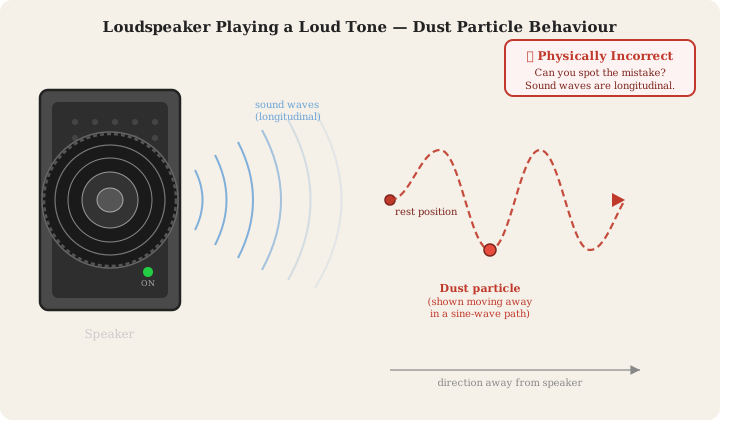
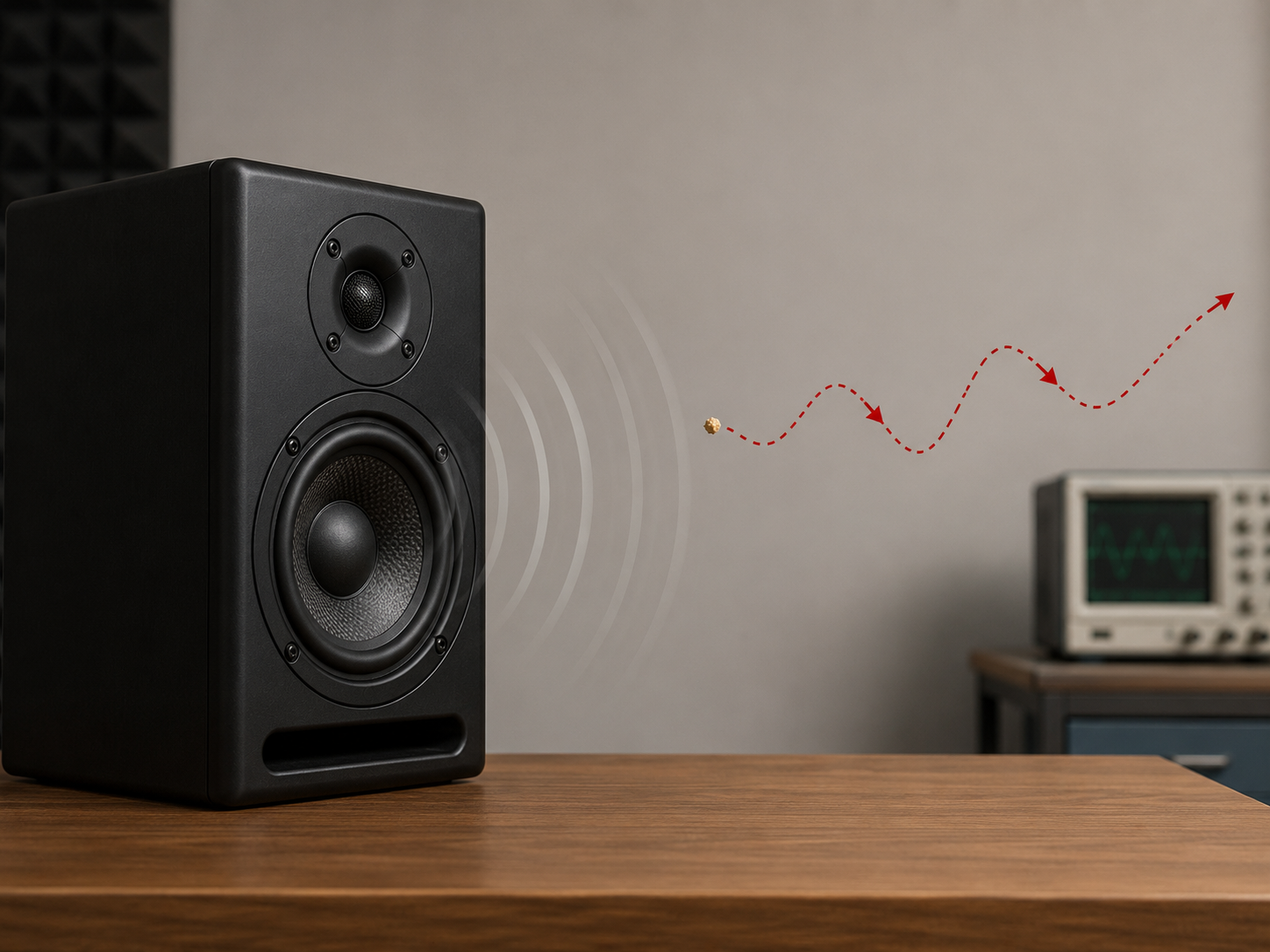
Why this matters pedagogically. A teacher can show students the correct answer alongside the AI’s wrong one and ask: “why does the AI get this wrong, and what does it tell you about how sound actually moves?” That conversation drives deeper understanding than just stating the right answer. The misconception-pair skill formalises this — generates a correct version and a textbook-distractor wrong version side-by-side, ready for class use.
Summary
| What the teacher does today | What AIPLA changes |
|---|---|
| Hand-prompts ChatGPT to build a simulation, then separately prompts for the paired tutor | A teacher-facing skill generates the sim and tutor together as a paired unit, with the tutor’s prompt referencing the sim’s UI |
| Each teacher reinvents prompts | Skill configurations + vetted paired-unit library on GitHub — share once, reuse class-wide |
| If chat is embedded, student’s own API key | Centrally-managed keys, no per-student accounts, per-group / per-class budget caps |
| No log capture — chat happens directly browser-to-Anthropic | All chat logs reach the research data store, anonymised by group ID |
| Wrong outputs are accidents | misconception-pair skill makes the wrong-output pattern a feature, not a bug |